How to use dxFUSE style file paths in Swiss Army Knife?

Hi everyone,
I'm struggling quite a bit simply trying to stream files instead of upload them every time, using the /mnt/project/ nomenclature.
The example provided for this on the webinar I attended is a bit more complex than I need right now:
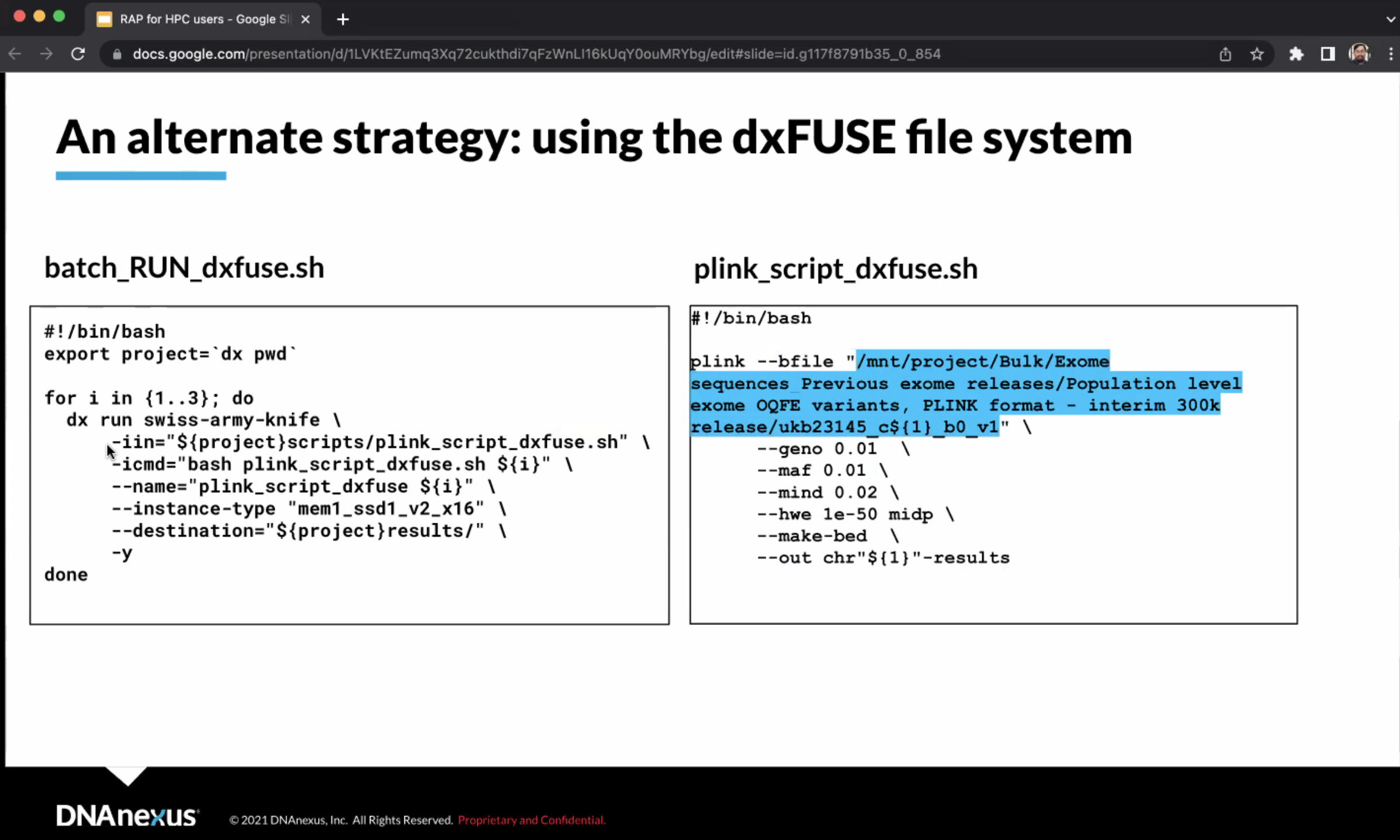 Instead of one script calling another one within a loop, let's just imagine that for now I have a single file, say /Bulk/Whole genome sequences/Whole genome CRAM\ files/60/6024088_23193_0_0.cram, and I just want to ls it to check the file indeed exists. If I "simply" use -iin using the path above, it seems to work (or at least it starts transferring the file, and I stop it halfway to avoid spending time pointlessly). However, if I use any combination of parameters prepending /mnt/project/ to the path, it fails without exception.
I receive the error:
dxpy.exceptions.DXCLIError: Value provided for input field "in" could not be parsed as file: could not resolve "/mnt/project/Bulk/Whole\ genome\ sequences/Whole\ genome\ CRAM\ files/60/6024088_23193_0_0.cram" to a name or ID
if I try to use the path as -iin, with $in_name within -icmd to specify the path to ls, and :
Traceback (most recent call last):
File "/Users/franciscorodriguez-algarra/.venvs/ukb/lib/python3.10/site-packages/dxpy/utils/resolver.py", line 1359, in parse_input_keyval
raise
RuntimeError: No active exception to reraise
During handling of the above exception, another exception occurred:
Traceback (most recent call last):
File "/Users/franciscorodriguez-algarra/.venvs/ukb/lib/python3.10/site-packages/dxpy/cli/__init__.py", line 36, in try_call
return func(*args, **kwargs)
File "/Users/franciscorodriguez-algarra/.venvs/ukb/lib/python3.10/site-packages/dxpy/cli/exec_io.py", line 776, in update_from_args
name, value = parse_input_keyval(keyeqval)
File "/Users/franciscorodriguez-algarra/.venvs/ukb/lib/python3.10/site-packages/dxpy/utils/resolver.py", line 1364, in parse_input_keyval
raise DXCLIError('An input was found that did not conform to the syntax: -i<input name>=<input value>')
NameError: name 'DXCLIError' is not defined
if I skip -iin and I use the path within the -icmd to run (i.e., -icmd='ls <wholepath>"). I have attempted including -imount_inputs= as well, but no matter how I write "true" (i.e., with or without quotes), it doesn't accept it. I am also requesting the exact same --instance-type as in the webinar slide. Including that parameter or not also doesn't seem to make any difference whatsoever.
Could anyone provide the minimal script necessary to request swiss-army-knife to ls a single file?
Also, is there any way to avoid receiving an email every time a job completes? With only a single file it is bearable, but when needing to run them on the entire WGS dataset... it would collapse the inbox.
Cheers,
Fran
Comments
2 comments
Just in case, I wanted to clarify that I know we can use `dx ls` for this. This is just a test so that I can then run samtools commands that are not available outside Swiss Army Knife
I think I managed to make it work by replicating the exact same procedure as in the example, namely by uploading a script within the RAP storage where the /mnt/project/ paths are included, and pointing at that script on the -iin parameter of the local submission script.
I assume that's the way this method is supposed to be used, but I don't think the documentation (or webinar recordings) make that point clear enough.
Please sign in to leave a comment.