Query of the week #7: About linking geno and pheno data

Hello everyone!
So far, we have focused primarily on phenotypes in this series, and I did not pay much attention to the question of linking phenotype and genotype data. For that reason, I started to think about what methods we can have and what the documentation actually says. I think the documentation has a lot about this topic and explains it pretty well.
A typical question would be - How can I enrich the phenotypic data, which is represented as a csv or a pandas df, with the genetic data? [1]. An important attribute (primary key) that enables linking the tables is the participant eid (sometimes also called participant id or sample id). Eid is the key column and in other words, it means to extract eids for pheno and then to obtain eids for geno data so that you can join/merge them together. In general, it shouldn't be too difficult. However, many aspects must be taken into account and I think it is not possible to come up with a super simple step by step tutorial that would cover everything and would be ready-to-go for all possible use cases. Among others, it is necessary to consider whether we plan to work with pVCF, BGEN or PLINK format, etc. The choice of bioinformatics tool would be also important. Overall, this sounds like a valid research question to me as is.
This "opinion" article is by no means an exhaustive list of all the ways how you might solve this problem (and by no means I am saying that it does optimally). I might be wrong too, I am here more speculating about this topic and focusing just on selected examples. How to export eids and other selected pheno data is shown in the Query of the week #1, so we can consider this as a prerequisite. The next step for us is the question of how to access geno data and export geno fields along with its eid.
From my experience, these are the areas and methods I would definitely start with:
- For applications, in which you would like to combine geno and pheno data, there is a guide on how is the filename convention for Bulk data looks like [2], i.e. typically each file contains eid in its filename so that would be the primary key to merge/join the geno vs. pheno datasets.
- For working with bulk data files, the data folders could be separated per category. Documentation [3] is suggesting to run a "dx find data" command to search for an EID in the filenames. Structure is as follows - dx find data --property eid=1234567 - replacing "1234567" with the EID you're trying to find.
- I would further recommend reading these two end-to-end tutorials which are amazing [4],[5]. It contains material that provides many useful details, of course in certain steps the tutorial needs to be tweaked according to your specific needs and you will need to incorporate a bit of your own creativity in order to achieve your specific research goals. Programming skills are quite useful here, I think.
- Another point of view might be to iterate over an exported list of eids (cohort of interest) to download and process Bulk files. I had a conversation around Imaging data on RAP [6], but a similar approach can be implemented for other bulk UKB-RAP data.
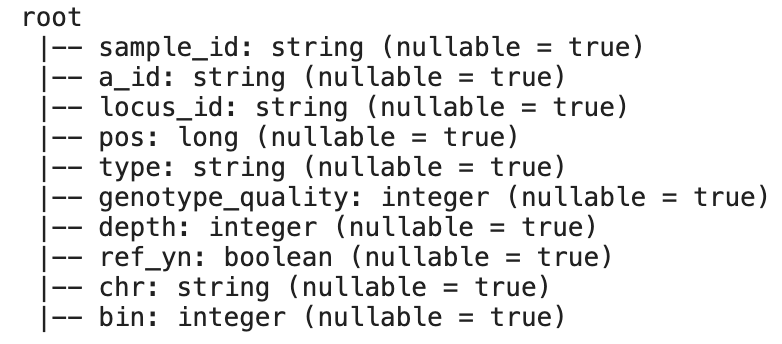
- Many of the geno/pheno fields were ingested to a Database record object. This is also accessible via Cohort Browser (for geno more specifically the Geno tab). And importantly, what is the big advantage of this DB representation, is that you can directly access and query the db tables [7]. It also provides a list of tables contained in the databases [8]. I went ahead and followed the instructions and implemented an example query retrieving data from geno table field 23146,

which gave me a pandas df with the following dataframe schema:
- Then next possible query is [9] - How do I link my derived data (i.e. list of individuals with SNPs of interest) to the other parameters? Or getting only the data for individuals with given SNPs. PLINK or other bioinformatics tools are suitable for such use cases. These tools are available on RAP [10]. I must not forget to mention here Hail, for which there is a tutorial on how to filter geno data, and then combine geno and pheno data for the subsequent GWAS analysis [11],[12],[13].
I hope this post resulted in a brief review of possible methods for linking geno data with pheno. I would really like to hear your thoughts on this topic.
References
[2] https://dnanexus.gitbook.io/uk-biobank-rap/getting-started/ working-with-ukb-data#filename-conventions
[4] https://github.com/dnanexus/UKB_RAP/tree/main/end_to_end_gwas_phewas
[5] https://dnanexus.gitbook.io/uk-biobank-rap/science-corner/gwas-ex
[6] https://community.dnanexus.com/s/question/0D5t000004EtXLYCA3/is-there-a-way-to-extract-the-bulk-imaging-data-using-the- spark-jupyter-notebook
[7] https://dnanexus.gitbook.io/uk-biobank-rap/working-on-the-research-analysis-platform /using-spark-to-analyze-tabular-data#accessing-the-database-directly-using-sql
[11] https://documentation.dnanexus.com/science/using-hail-to-analyze-genomic-data
[12] https://github.com/dnanexus/OpenBio/blob/master/hail_tutorial/gwas.ipynb
[13] https://github.com/dnanexus/OpenBio/blob/master/hail_tutorial/filter_chrpos.ipynb
Comments
6 comments
Dear {@005t0000006BZL2AAO}?
First and foremost, I would like to express my appreciation for your prompt and professional responses to our inquiries, as well as for your attention to our requests. This article is a response to multiple requests from researchers.
I understand that it may be challenging to cover all cases related to working with various types of data, but I believe that any example related to working with pVCF, BGEN, or PLINK would be suitable for many of us. The example with the "dx find data --property eid=1234567" command is fascinating, but it is more applicable to researchers working with computer vision. It would be more convenient for most of us to have one file with data for a single chromosome for all 502,000 EIDs, rather than 500,000 individual files.
Therefore, we need an example where 502,000 rows of phenotypic data are enriched with genetic data for the 19th chromosome positions ranging from 1836158 to 18389176. The end goal is to have a dataframe that I can analyze and use for logistic regression.
I also want to mention that I receive quite a few messages in this community from other researchers in different teams, so this question is quite common.
Thank you again for your assistance and support.
Dear colleagues,
{@005t00000089ohSAAQ}?
{@005t000000149vjAAA}?
{@00560000001jOfvAAE}?
I would be immensely grateful for your assistance and support. If you have the time, I would greatly appreciate it if you could help us out.
Thank you in advance for your kindness.
Best regards,
Alex
Ted Laderas ?
Hi Alex,
You can query the "field_id" property to pull pVCFs and such. This one will pull the 450k release pVCFs (https://biobank.ndph.ox.ac.uk/showcase/field.cgi?id=23148)
dx find data --property field_id=23148
Ted
@Ted Laderas?
Hi, Ted,
Thank you very much for your response.
I apologize, but I did not fully understand what I need to do.
I have completed the suggested command and have attached the result.
I have obtained phenotype data in a DataFrame for all 502,410 patients, which I find convenient to work with using Pandas.
Now, I would like to add genetic information from chromosome 19 to this phenotypic data. I would appreciate any code and/or recommendations on how to do this.
As a result of this enrichment, I would like to have a DataFrame with 502,410 rows. (After this, I will be using logistic regression).
If my approach is incorrect, I kindly request your advice based on your experience and best practices.
Hii @Ted Laderas? ,
Many of us are interested in a similar problem. I have created a cohort and extracted the phenotype and covariates to a CSV file using the cohort browser. I have 3,25,125 participants in my data. For those participants only, I want to extract genotype data on 22 chromosomes (Bulk/Genotype Calls/ .bim, .bed, .fam files). The end goal is to attach them to the data frame either in Rstudio/JupyterLab to perform regression (GWAS).
Thanks
Saurabh
Hi {@005t000000BBwZQAA1}? and {@005t000000BBzagAAD}?
I think there are two main ways to do this (maybe {@005t0000006BZL2AAO}? and others can chime in here):
1) Use PLINK in the Swiss Army Knife app to filter the pVCF or bed/bim/fam files by region and subject, and then extract the genotype using PLINK commands.
2) Use Hail to work with BGEN Files in the MatrixTable format. Use Hail subsetting to subset the genotypes. Load your pheno file as a Hail Table. Use mt.semi_join_cols() to subset the MatrixTable with your Pheno File, and then use MatrixTable.export() or MatrixTable.to_pandas() to get the MatrixTable to output in your desired format. This post about troubleshooting Hail and these notebooks [BGEN Import, Filter by Region, and GWAS (Section 3)] are helpful in going this route.
I hope that this is helpful. I'm not always on community, but I'll try and be as responsive as I can.
Please sign in to leave a comment.