Table exporter failing to see my txt.files

I am trying to use Table Exporter to extract several txt.files each one made by selected fields.
I have used R codes in Jupiter lab to generate these txt files.
I have saved each files in my project and they look like the image below.
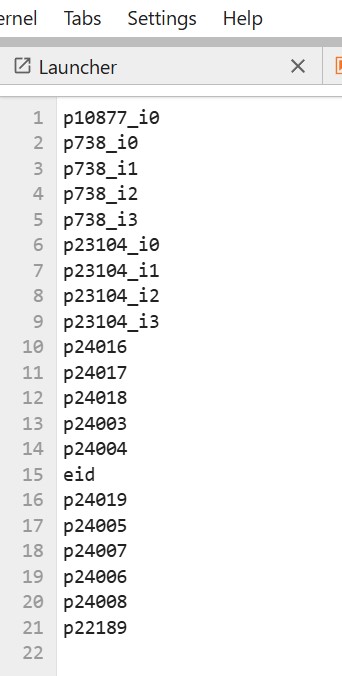
I now wanted to use Table Exporter to extract these txt files and its data fields from the main UKBB record. But while I can see some other files in my project, I cannot see these specific txt files. It also does not change if I convert the txt into csv files. If Table Exporter does not work, can I export these files using ttyd? if so, how? Thanks. Any other way to do it?
Thanks. Federica
Comments
1 comment
What’s tripping you up is this:
Table Exporter doesn’t “export files from your project”. It exports columns from the dispensed UKB Dataset / Cohort / Dashboard into a new CSV/TSV. The only role your
.txtcan play is as a field list input (thefield_names_file_txtparameter), not as “data to export”.So if your
.txtfiles are lists of field-names likep738_i0,p23104_i1, etc (like your screenshot), that’s perfect. But they must exist as DNAnexus “project files” in the same project, and then you point Table Exporter at them via File Containing Field Names.1) First check: are those files really in the project?
In JupyterLab/RStudio, it’s easy to create a file in the notebook’s local filesystem and think it’s in the project. The docs explicitly warn that local environment files won’t persist unless you upload them.
Open a ttyd terminal (or the Jupyter terminal) and run:
If your files don’t show up in
dx find, Table Exporter won’t see them either.If they’re only local, upload them:
(You can choose a folder instead of
/.)2) Make sure the field list format matches what Table Exporter expects
Your
field_name.txtmust be:participantvsolink_instance_0etc.)Also, if you want
eid, you typically must include it in the field list and set the correctentity(common gotcha).3) Use Table Exporter the “intended” way
In Table Exporter, the primary input is Dataset/Cohort/Dashboard, not your
.txt.participant).txtfileThen Table Exporter will generate the output CSV/TSV in your project.
4) If Table Exporter still doesn’t cooperate: use
dx extract_dataset(often simpler)The RAP guide itself suggests programmatic extraction using
dx extract_dataset(you can run this in ttyd/Jupyter terminal).At a high level you:
dx extract_dataset ... --fields ... --output ...(The guide has a full worked example, including how to discover the dataset id and build the
--fieldsstring.)5) “Can I export/download the files with ttyd?”
You can move files around inside RAP easily (upload/download into the compute environment, between folders, etc.) using
dx download/dx upload.But egressing participant-level data off the platform may be restricted by policy/tier. The RAP docs note the platform may block certain external downloads and you’re responsible for staying within the MTA rules.
If what you’re downloading is just field-name lists (no participant rows), that’s usually fine. If it’s participant-level extracted phenotype data, expect restrictions.
If you paste the output of:
(or one exact filename you expect), I can tell you immediately whether it’s an “upload didn’t happen”, “wrong project”, “hidden file”, or “Table Exporter is being pointed at the wrong thing” situation.
Please sign in to leave a comment.